Docgrity logo

docs · integrity · confluence

Your wiki disagrees
with itself. Docgrity finds where.

Duplicates, contradictions and open questions across your Confluence pages — with verbatim evidence and likely owners. Nothing changes without your click.

Install on Confluence — Free → How it works
0 servers · 0 accounts · 0 telemetry works instantly · no AI key needed installs in under a minute
What it finds

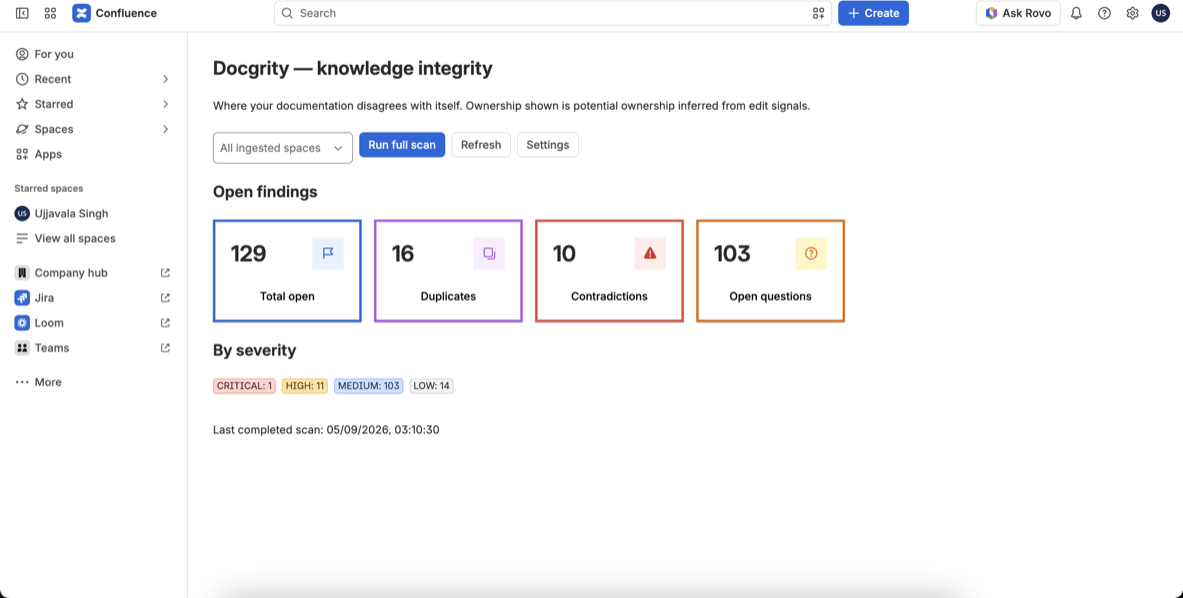
Three kinds of wiki rot, each with verbatim evidence and a confidence score. On a real site: 129 findings from one scan.

85%Duplicates

Pages that should be one

Near-identical pages, detected by built-in heuristics — free, no AI key.

91%Contradictions

Facts that don't agree

“The SLA is 4 hours” vs “24 hours” — quoted side by side. Needs your AI key.

95%Open questions

Questions nobody answered

Stale TODOs and unanswered questions, with potential owners from edit history.

See every finding — with evidence

A dashboard inside Confluence: findings grouped by type and severity, each quoting the exact text it's based on.

Docgrity dashboard showing findings across a Confluence site
The overview dashboard after a full scan — click any tile to drill into that finding type.

Why it's different

Zero infrastructure

Runs 100% on Atlassian Forge. In no-AI mode, nothing leaves your site.

Works instantly

Built-in heuristics find duplicates & open questions — free, no AI key.

Evidence, always

Every finding quotes the exact text it's based on.

Humans approve

Nothing is edited or archived without your click. Every action audited.

Unlock contradiction detection

Add your own Gemini, OpenAI or Anthropic key to spot facts that don't agree — “the SLA is 4 hours” vs “24 hours” — plus smarter duplicate matching. Your key, your provider terms, no markup.

Up and running in a minute

InstallOne click from this page. Forge app, no servers.
ScanHit “Run full scan” — heuristics work immediately.
FixReview evidence, notify owners, merge duplicates.

Docgrity for VS Code Available now

The same checks for your repo's markdown — READMEs, ADRs, runbooks — inside VS Code.

Same checks, your repo

READMEs, ADRs and runbooks checked inside VS Code.

Powered by your Copilot

Uses your Copilot subscription. No keys, no servers.

Fix via GitHub issues

One click drafts an issue with evidence — you approve.

Learn more about Docgrity for VS Code →